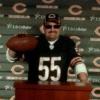
September 13, 201115 yr comment_94835 This is my latest video. This week I had a youtube friend fly up from Augusta Georgia to go to the game with me. This video doesn't have any of my crazy editing or anything off the wall. It's just the sights and sounds of what we experienced at the tailgate and our journey to and from the stadium. I hope you all enjoy this. Report
September 13, 201114 yr comment_94849 Not being able to get to Chicago have to say I enjoyed watching that, thanks for sharing Report
September 14, 201114 yr comment_94896 Thanks for the video DTG. Ah to be amongst fellow Bears fans!!! What an experience. Hope someday to actually see them play live. Again thanks much... Good stuff Report
September 14, 201114 yr comment_94899 Great video, Brother. I haven't been to a game since the Sunday Night Cowboy debacle a few years back. Damn how I miss it!!! Report
September 14, 201114 yr Author comment_94914 Thanks everyone! This was a lot of fun to make. YBR is planning on doing more webcasts from the tailgate and is looking to hookup with different tailgaters each week. So it feels good that I could be a part of that last week. I'm going to the Panthers game on Oct. 2nd, so we're planning on doing that again for that game. If you haven't made it out to a Bears game, you gotta do it at least once in your lifetime. There's no other feeling in the world than being surrounded by all the fans and just feeling the sights and sounds of everything going on around you. If you didn't see the pregame tailgate broadcast with YourBoyRoy and me, here is a link. http://www.ustream.tv/recorded/17208038 It's funny how my Atlanta Friend called out the "No Huddle" before the game. And a lot of our points held true during the game! Report

Join the conversation
You can post now and register later. If you have an account, sign in now to post with your account.